Answer the checklist
For: Internal Auditors and Area Managers
Whole guide as PDF (510 KB)The checklist is split into sections, listed on the left with how many questions each holds. The top of the screen shows how many questions are done and the running score.
- Press a section, then press a question.
- Choose Pass, Fail or N/A.
- N/A means the question does not apply to this outlet. It is left out of the score.
- If you chose Fail or N/A, write a comment saying why. The box is marked required. For a Pass, the Note (optional) box is there if you want it.
- Add the photos the question asks for. A question shows how many photos it needs, whatever the answer.
- Press Next item to move on, or Previous to go back.
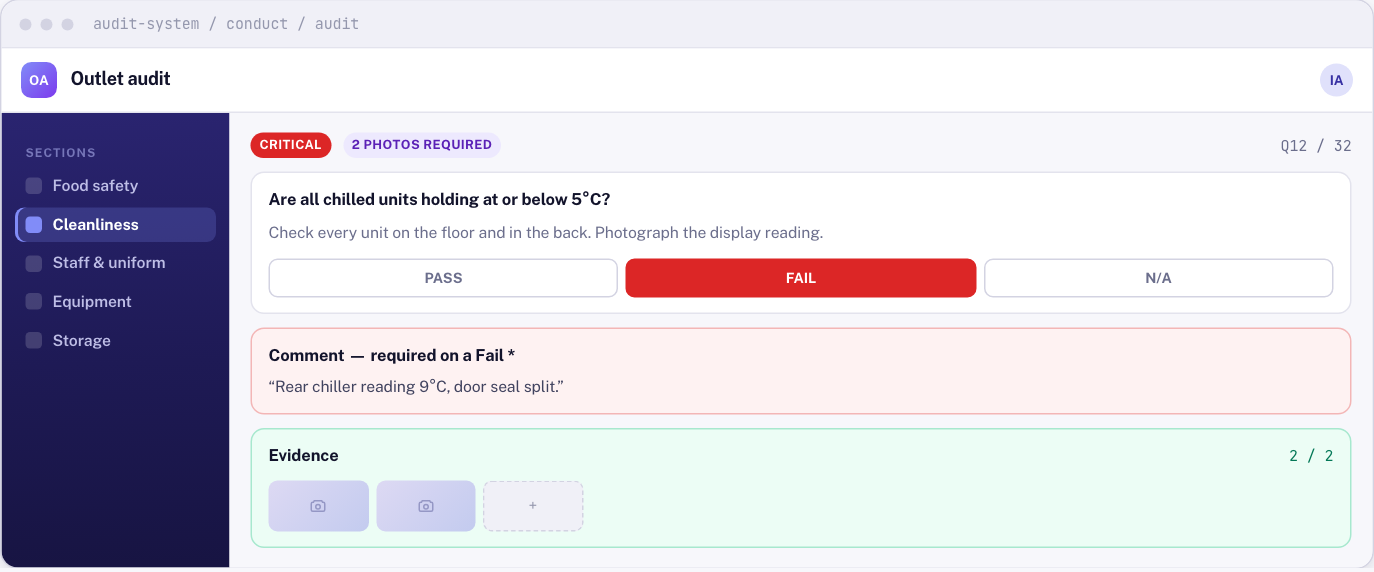
You can leave a question and come back. It stays incomplete until it has an answer, its comment if one is needed, and its photos.
Critical questions
A question marked CRITICAL is one that could close a shop or hurt someone. If it fails, the whole audit fails, whatever the percentage.