Set up outlets, people and checklists
For: Administrators
Whole guide as PDF (510 KB)Do these in order. Each step needs the one before it.
1. Areas and outlets
Open Areas, then Outlets, under Master data. An outlet belongs to an area. Outlets normally arrive from your company's records in the Portal. Use New area or New outlet only for something the Portal does not have.
2. People
Open Users under System. Each person's name and phone come from the Portal sign-in and cannot be changed here. Here you set:
- their role, with Edit
- extra outlets they may work on, with Assign outlets
Who manages which outlet normally comes from the Portal. Until a person is linked to their outlets, an Area Manager or Outlet Manager sees empty screens and will think the system is broken. If someone says "there is nothing here", check this first.
3. Checklists
Under Template authoring:
- Templates: the checklist itself, for example "Standard SOP checklist".
- Template Versions: dated editions of a checklist.
- Sections: groups of questions inside a version.
- Questions: the questions themselves, with how many photos each needs and whether it is critical.
- Question Library: shared questions you can reuse, so the same check is worded the same way everywhere.
Mark a question critical only if failing it should fail the whole audit.
4. Publish
Auditors cannot see a draft. Open the draft in Template Versions and press Publish. From then on it is offered in Start an audit. Audits already submitted keep the version they used.
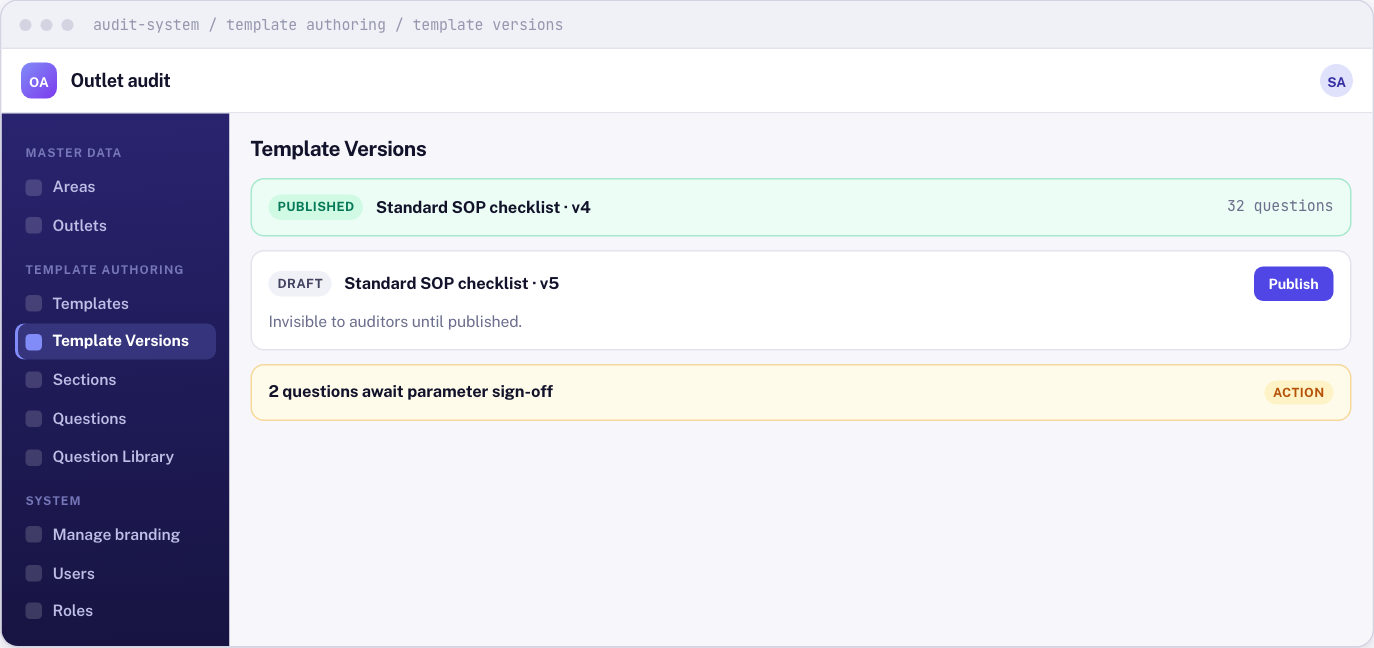
Some questions carry legal or safety limits, such as a fridge temperature. These need you to press Confirm parameter before they are treated as confirmed.
To stop using an old checklist, set Retired on on its template. It disappears from Start an audit and from new schedules. Finished audits keep it.
Running it day to day
- Manage branding under System sets the name and logo shown on screens, the sign-in page, and the reports.
- Roles under System sets what each role may do.
- If an audit sent twice was settled the wrong way round, open it from Audit Register and choose Void this record, promote the rejected copy. Only you can do this. It creates a new record and erases nothing.