Respond to an audit of your outlet
For: Outlet Managers
Whole guide as PDF (510 KB)When your outlet is audited, you have 72 hours to respond. You may also get the report by email or WhatsApp, if your company has switched those on.
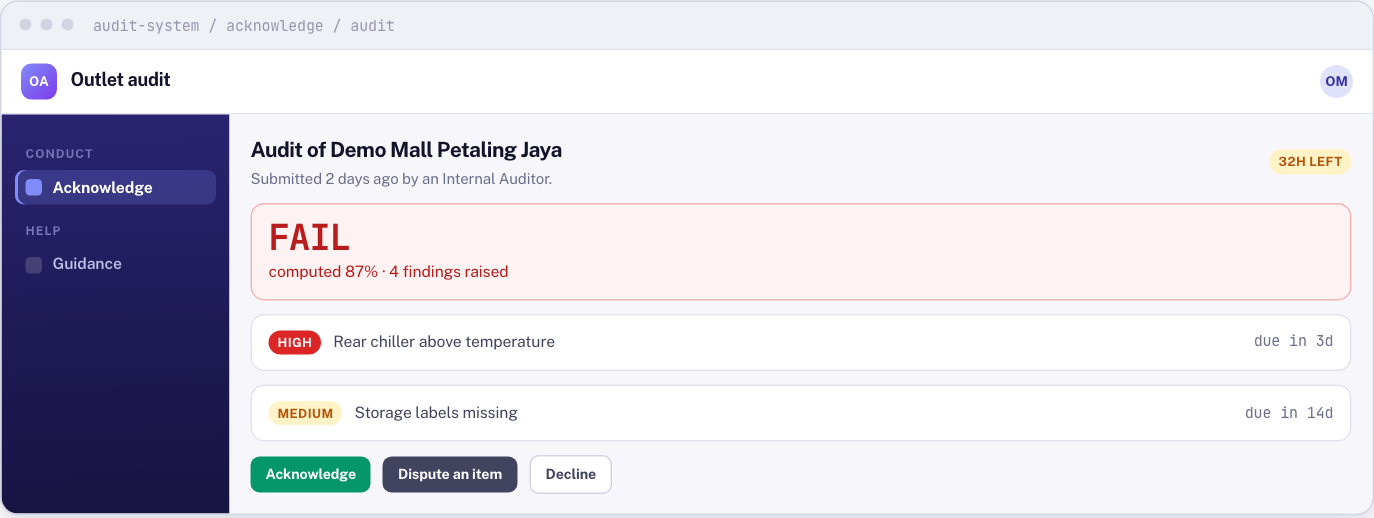
- Open Acknowledge in the menu on the left. It lists audits of your outlet that are waiting for you.
- Open the audit. You see the verdict, the score, every failed question, the auditor's comments and photos, and the deadline for each finding.
- Choose one answer:
- Acknowledge: you have read it and accept it.
- Dispute an item: you accept it except for some items. Pick the items under Items you dispute and write Why. Your dispute is saved on the audit, where your Area Manager can see it. There is no separate review step on screen yet.
- Decline: you do not accept it. Write a Reason.
There is nothing to sign. Your sign-in is your signature. You cannot change your answer afterwards; if your position changes, talk to your Area Manager.
What your answer changes
None of the three answers changes the score, the findings or the report. If something is wrong, use Dispute an item and say what and why. Do not leave it unanswered.
If you do not respond in 72 hours, the audit goes to your Area Manager, marked as not acknowledged. The result and findings still stand.