Check a customer's top-up
For: Finance team and administrators
Whole guide as PDF (1 MB)Customers top up in the customer app: they choose an amount and a payment mode, and the app sends them to your company's payment provider (UPG) to pay. That payment step happens on the provider's own page, not in the wallet. When the provider confirms the payment, the money appears in the customer's Available balance straight away.
Use this screen when a customer says "I paid but my balance did not change".
- Open Top-ups in the menu, under Top-ups.
- Type the reference the customer quotes into Search (it starts with 0030-). Search does not look at names.
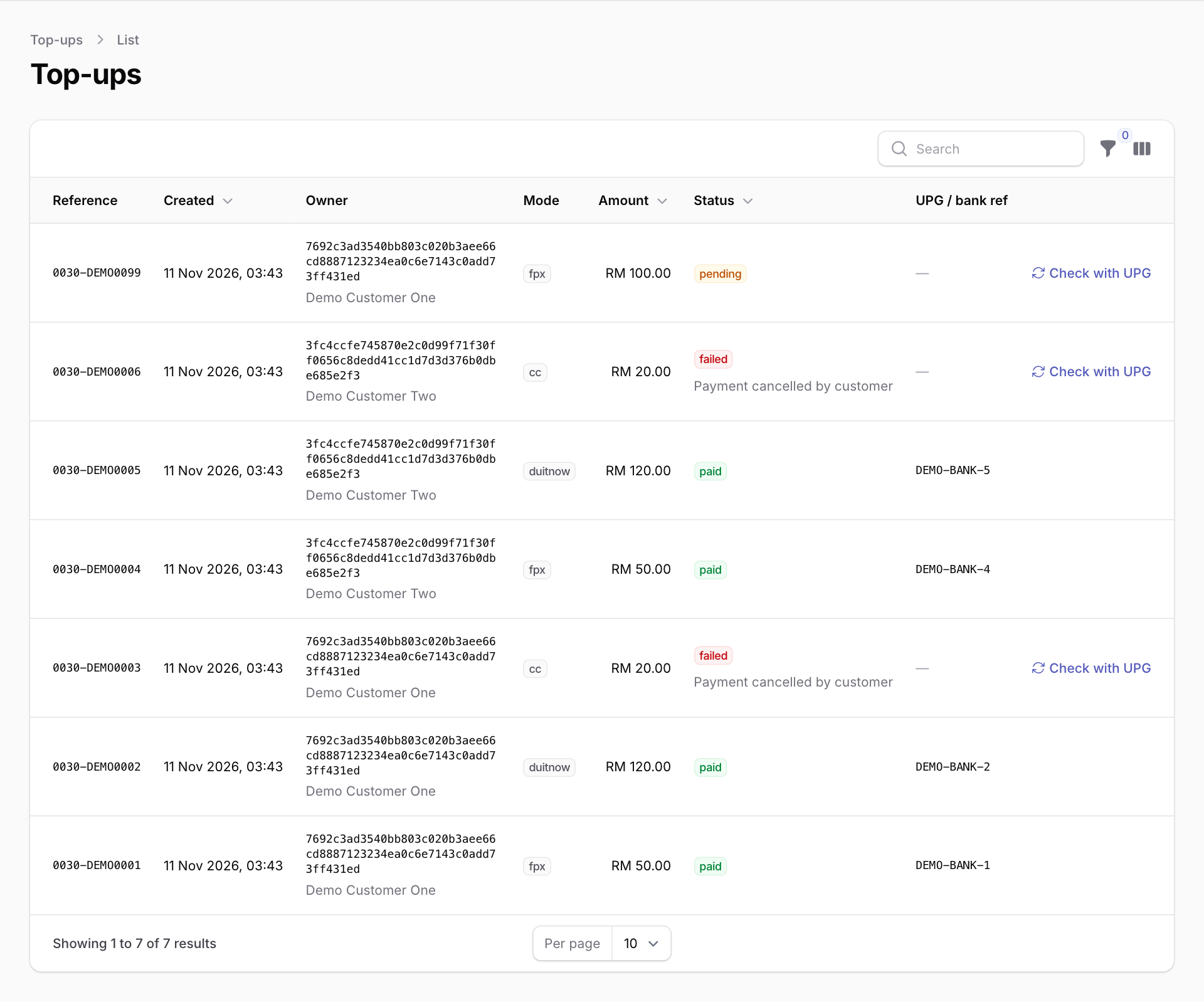
- Read the Status:
- paid: the money is in the customer's balance. UPG / bank ref is the provider's reference, if the customer needs to quote it to their bank.
- pending: the customer started paying but the provider has not confirmed yet.
- failed: the payment did not go through. The reason is shown under the status.
- expired: nobody finished paying in time.
- For a pending or failed top-up, press Check with UPG. The wallet asks the payment provider for the latest answer. If the provider says it was paid, the money is added to the balance then. A message tells you the result.
The wallet also checks unfinished top-ups with the provider by itself every five minutes.
You cannot add money to a customer's balance from this screen. A top-up only counts once the payment provider confirms it.