Trace a money movement in the journal
For: Finance team and administrators
Whole guide as PDF (1 MB)The Journal lists every movement of money in the wallet, newest first. Nothing in it can be edited or deleted: a mistake is fixed by adding a new movement that undoes it, so you can always see both.
- Open Journal in the menu, under Ledger. The page is headed Transactions.
- Search for a reference, or press the funnel button to filter by Type, Status or Merchant.
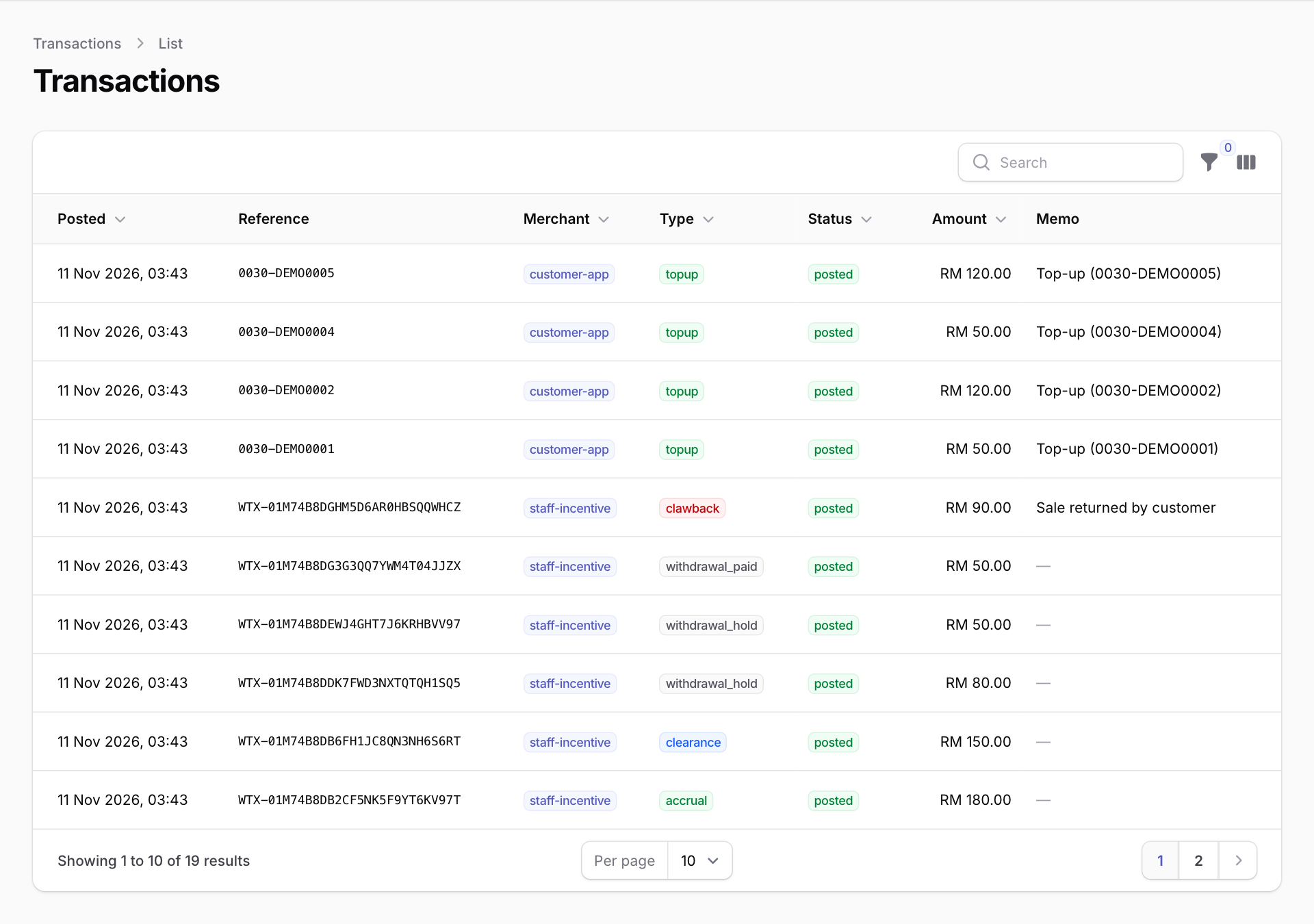
What the types mean
- accrual: a staff member earned incentive money. It starts in Pending.
- clearance: earned money became ready to withdraw (moved from Pending to Available).
- clawback: earned money was taken back, for example because a sale was returned. The Memo says why.
- debit_recovery: new earnings paid off money the person owed.
- withdrawal_hold: money set aside when a staff member asked for a withdrawal.
- withdrawal_paid: a withdrawal was paid to the bank.
- withdrawal_returned: a withdrawal came back (rejected, or refused by the bank) and the money went back to Available.
- reversal, manual_adjustment, forfeiture: corrections made by a person, each with a recorded reason. A forfeiture writes off the unclaimed balance of someone who has left.
- topup: a customer top-up that was paid.
Corrections are made by the app that owns the wallet. There is no button for them on this screen.