Register your bank account
For: Staff
Whole guide as PDF (2 MB)You need a bank account in your own name before you can withdraw. Accounts in someone else's name cannot be used; this is a legal rule.
- Press the circle with your initials on Home to open Account, then press the button under Bank account.
- Choose your bank from the list.
- Type the Account number: digits only, no spaces or dashes.
- Type the Name on the account exactly as your bank has it. It is checked against your registered name.
- Press Continue and confirm with the code sent to your phone.
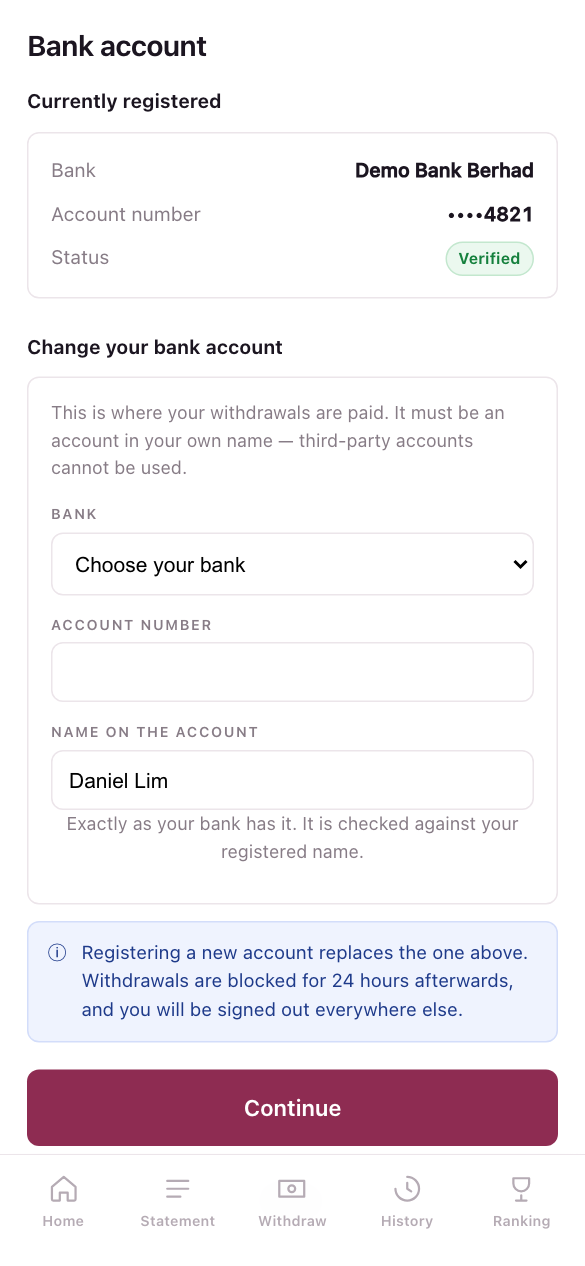
The account is checked with a RM 1 transfer and a name check. Until that passes, it shows Awaiting verification and you cannot withdraw to it.
Registering a new account replaces the old one. Withdrawals are then blocked for 24 hours, and you are signed out on your other devices. This protects your money if someone changes your account without your knowledge.