Read the reports
For: Finance, Merchandiser, Marketing
Whole guide as PDF (2 MB)- Open Reports in the menu.
- Pick a report from the tabs: Sales, Products, Promotions, Returns, Payments, Stock, Order export or Attribution (where customers came from).
- Choose the dates and one Region. Each region stays in its own currency; regions are never added together.
- Press Download CSV for exactly what is on screen, to open in Excel.
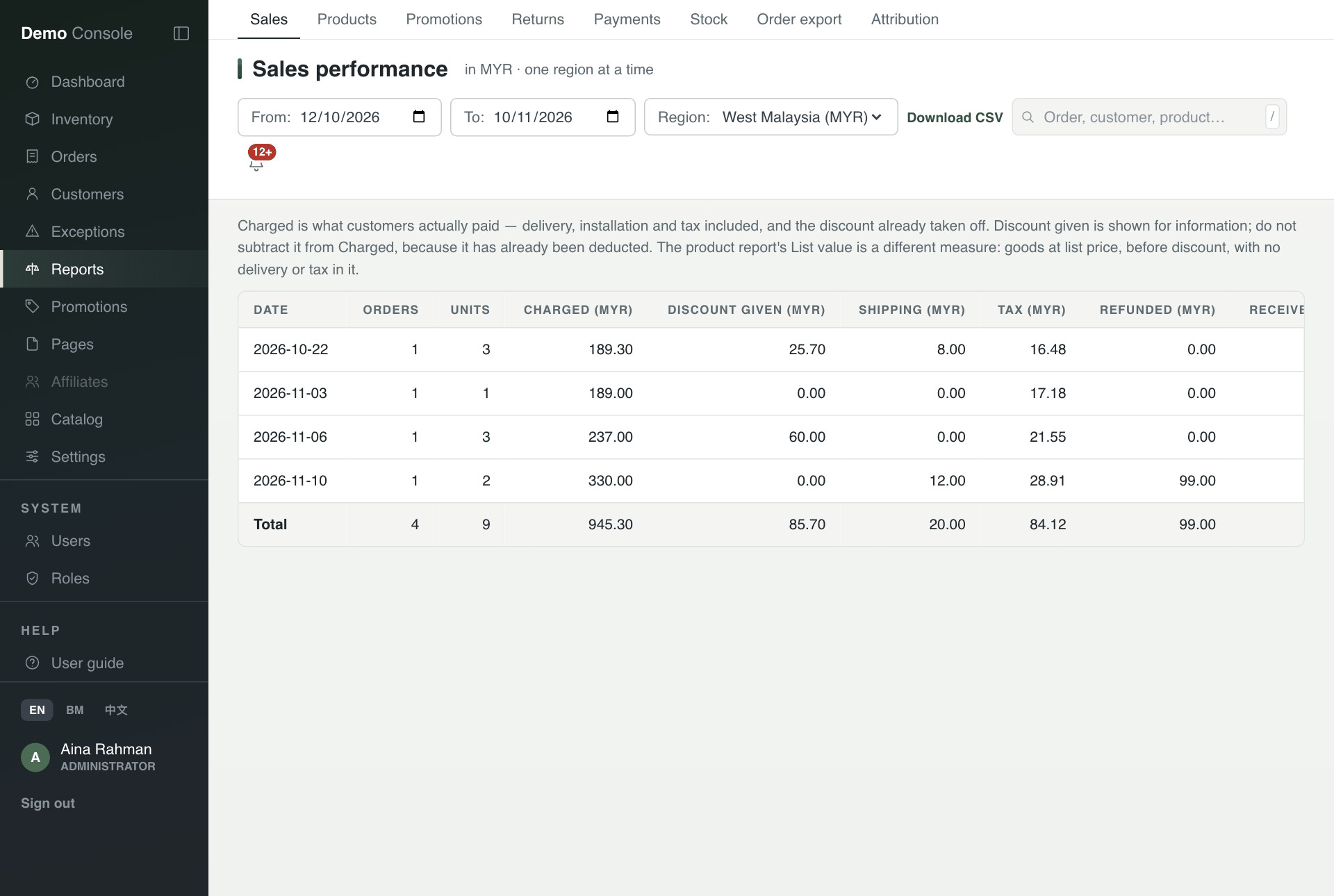
Reading the sales report
- Charged is what customers paid: delivery, installation and tax included, with the discount already taken off. Do not subtract Discount given again.
- Received is the money taken less refunds.
- The figures are stored overnight at 02:00 for each day. A day with no row means nothing was sold, or the overnight figures did not run. If a message says Some figures are missing, check Exceptions before reading a gap as zero sales.
You only see the reports your role allows. For example, the sales and payment reports are for Finance and Administrators.