The admin area
For: Administrators
Whole guide as PDF (2 MB)Only people with an admin role can open it. Everyone else gets "This action is unauthorized".
To open it, press Administration in the menu on the left, or press your name at the top right and choose Administration. It is also linked at the bottom of the front page.
The Dashboard shows memos on the board, published procedures, access requests waiting for an answer and active users. Latest memos shows how many people have read each one.
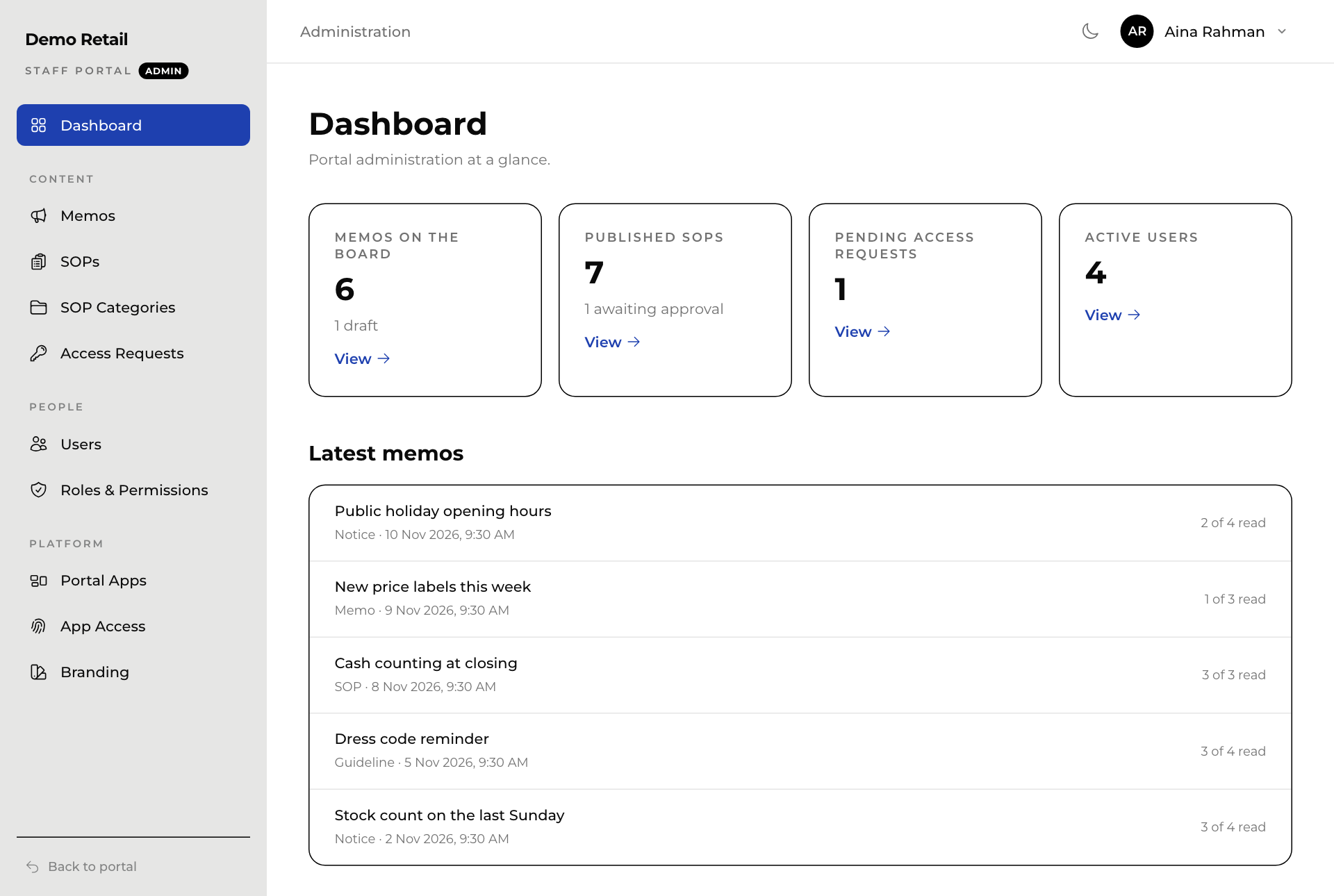
| Menu | What you do there |
|---|---|
| Memos | Write, send, pin and follow up memos. |
| SOPs | Add procedures and publish new versions. |
| SOP Categories | The groups in the SOP Directory. Each has a short code that starts every procedure code in it, for example RO for SOP-RO-001. |
| Access Requests | Staff asking to read a locked procedure. |
| Users | Each person's details and admin roles. |
| Roles & Permissions | What each admin role may do. |
| Portal Apps | The tiles on staff Home screens. |
| App Access | Who can open which app. |
| Branding | Your company name, logos, colour and front page text. |
You only see the menu items your role allows. Back to portal at the bottom left returns you to your own screens.